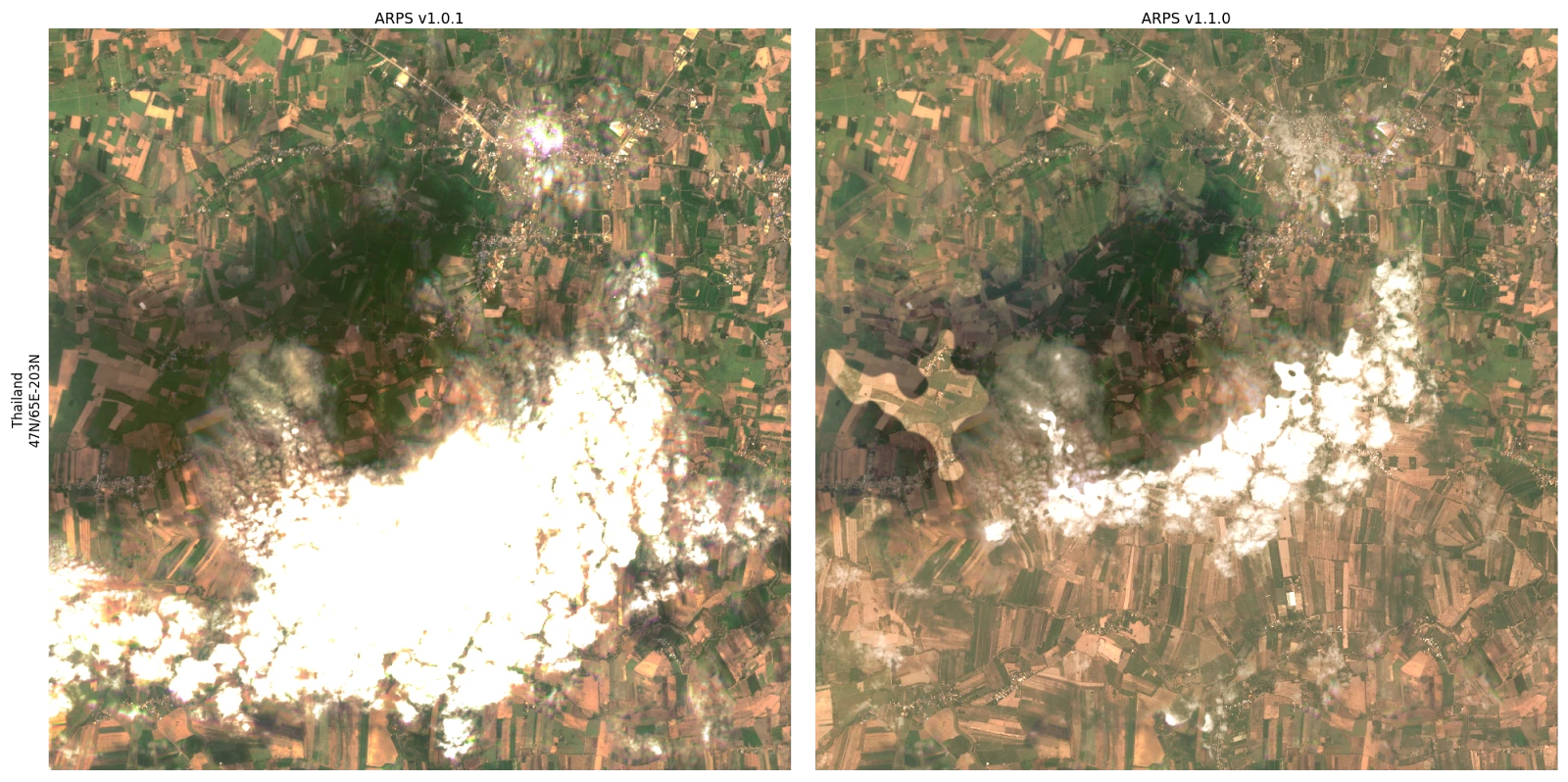



ARPS version 1.1.0 delivers significant enhancements to image quality and consistency, primarily through a refined approach to scene stacking and merging. This minor release introduces a new feature—refined scene compositing—which increases clear-sky coverage and brings substantial improvements to radiometric and geometric performance, as well as cloud mask accuracy. These updates ensure a more seamless, robust, and reliable product, especially in challenging imaging conditions. Note also that selecting the “best” scenes in a cloud-mask-aware way may lead to visible discontinuities where different scenes meet. See the examples at the end of this document.
Improved Image Quality and Consistency
New Feature: Refined Scene Compositing
This release introduces a new process for combining multiple PlanetScope observations for a given date. Instead of selecting scenes before harmonization, the system now merges scenes acquired from each satellite into strips, harmonizes the strips individually, then aligns and merges them, stacking the best scene on top. When an area of the best scene is flagged as cloud-contaminated, that region is replaced by clear-sky pixels from the next-best scene from the same day (where available). This results in:
- Increased Clear-Sky Coverage: By leveraging pixels classified as clear-sky from all available scenes (from different satellite strips), we can now deliver a more complete, cloud-free product.
- More Consistent: The process uses cloud masks to identify and preserve clear-sky pixels, ensuring smooth, invisible transitions across scene boundaries.
Additional Improvements
The processing was adjusted to collect images that are strip-specific rather than solely by date. The processing now stacks images within each satellite strip first before harmonization and alignment, which are then combined into a final tile. This results in significantly improved radiometric and spatial consistency between overlapping strips and between adjacent tiles.
Radiometric Improvements
Several modifications enhance the accuracy and consistency of surface reflectance data:
- Improved Topographic Corrections: The robustness and accuracy of corrections for rugged terrain have been enhanced. The band-specific correction factors are now recalculated using a model trained on initial values as a function of illumination condition, sun elevation, sun azimuth, and aerosol optical depth.
- Robustness Against Imperfect Reference Data: The radiometric harmonization process is now more resilient to imperfections in the FORCE reference data. The system now downweights lower-quality FORCE observations, reducing outliers in the time series and ensuring a more robust calibration.
- Improved Quadrant-to-Quadrant Consistency: Several operations now occur at the tile level rather than the inner-tile level, significantly reducing discontinuities within an AOI.
- Handling of "Suspect" Imagery: Imagery flagged as "bad" due to indications of incorrect radiometry will now be retained in the final SR raster (masked in QA Band 1 with values of 7, “suspect”) if no better image is available. This reduces instances of completely missing tile/quadrant data. These scenes will be included in “PERCENTAGE_BAD_RADIOMETRY” totals (see “Metadata Improvements”).
- Reduced incidence of Gibbs artifacts: Gibbs artifacts (“ringing”) near nodata boundaries have been significantly reduced, although they may still occur.
Cloud Mask Improvements
The accuracy of cloud and haze detection has been refined:
- Refined Cloud Verification: The cloud mask verification process has been updated to reduce both false positives (commission errors) and false negatives (omission errors).
- Haze Detection Improvements: Aerosol Optical Depth (AOD) measurements from MODIS are now used to validate and augment UDM haze detections, helping to remove erroneous haze flags on days that MODIS indicates are clear and to mark entire regions as “haze” when the overall atmospheric conditions are poor.
- Fix for Backfill Data: A fix was implemented to ensure that invariant features are correctly calculated for early data in a backfill, which will positively impact cloud masks and radiometry during those initial periods.
- Flag “Suspect” Pixels Near Nodata Boundaries: Narrow strips of pixels near nodata boundaries may now be marked as “suspect” when geometric shifting has increased uncertainties in their radiometry.
Geometric Improvements
- Decreased Incidence of Geometric Outliers: The refined scene compositing approach ensures more robust geometric harmonization.
- Identification of Geometric Errors: Images with significant geometry errors (e.g., heavy contamination, fuzziness, or rectification issues) are now flagged as "suspect" (mask value 7) and included in “PERCENTAGE_BAD_GEOMETRY” totals (see below). These will be kept in the final product if no clear scenes are available, consistent with the image quality update above.
Metadata Improvements
- Approximate Per-Band Statistics: Surface reflectance band statistics (mean, standard deviation, minimum, maximum, and valid percent) are now computed from the SR rasters and included in the GeoTIFF metadata for all bands.
- Color Interpretation for NIR Band: Color interpretation metadata is now set for the NIR band, which previously had only been set for the RGB bands. This improves compatibility with GIS tools that rely on band interpretation metadata.
- STAC Item Metadata: Metadata keys that were previously only available in the header of the QA rasters are now also included in the corresponding STAC items. Additionally, per-band raster:bands metadata (including data type, nodata, spatial resolution, scale, and offset) is now reported for both SR and QA assets, and band-level statistics (mean and valid percent) are included in STAC item deliveries..
- STAC Item Delivery to Bucket: STAC items and catalog files are now delivered directly to customer delivery locations alongside the raster products.
- Scene Quality Metadata: Provided metadata fields now include “PERCENTAGE_BAD_GEOMETRY” and “PERCENTAGE_BAD_RADIOMETRY” keys which provide scene-level quality measures.
Image Discontinuities due to Best-on-top Selection
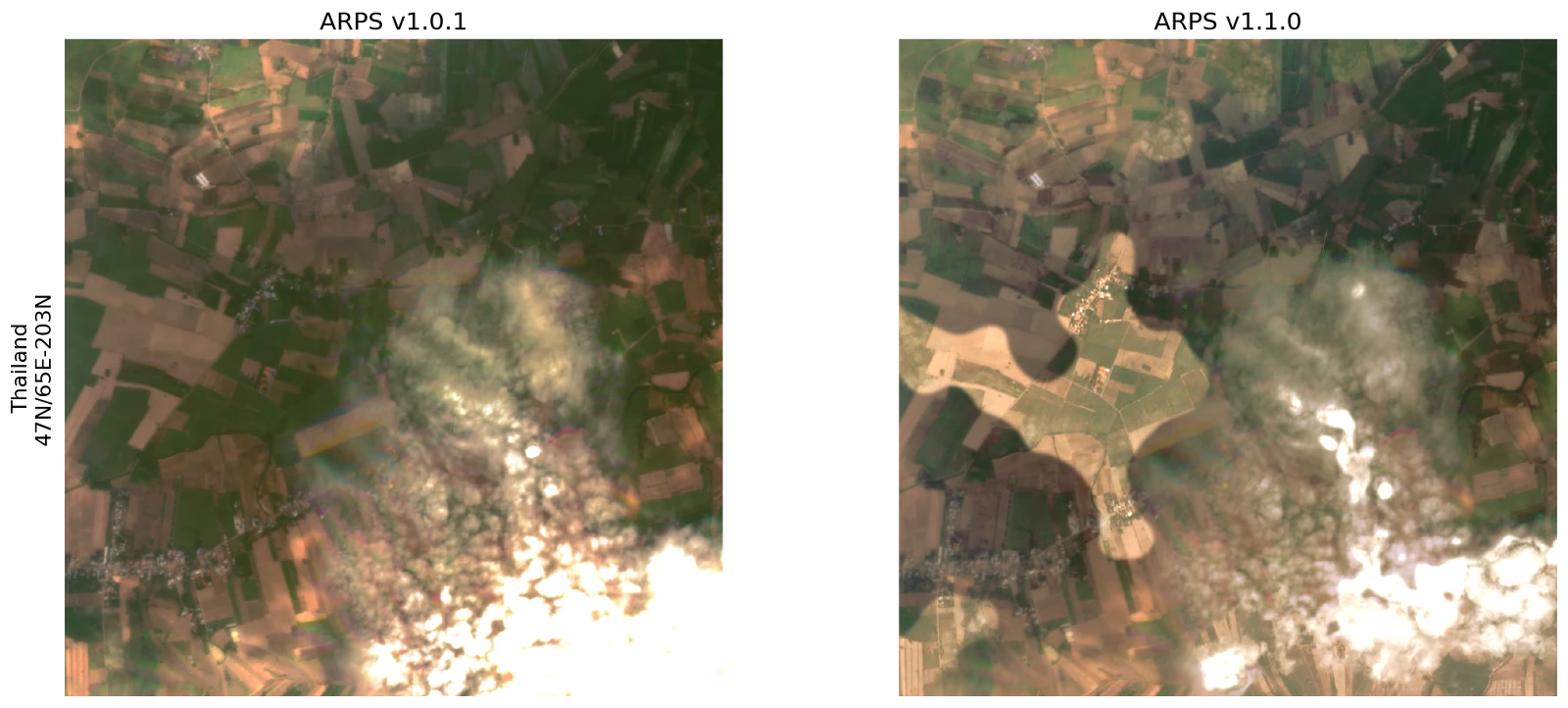
The newest version of ARPS uses cloud mask labels to determine the “best” scene. This means that, depending on what scene data are available and how those pixels are classified, portions of cloud, shadow, or haze features may be replaced by data from different scenes, creating discontinuities. The result is intended to provide users the best available of the contaminated data, increasing usability for analytic applications. This can sometimes come at the cost of introducing abrupt transitions between portions of scenes. Note that scenes are blended together at the boundaries to reduce transition artifacts, but that contaminated regions are never blended into clear regions. We may, however, blend between differently-contaminated regions (e.g. a region with haze from one scene bordering a region with cloud shadow from another scene).
Prioritization for scene selection by cloud classification runs: Clear > haze (4) or other contamination (6) > cloud shadow (3) or adjacent clouds (5) > suspect (7) or bright clouds (2). Please refer to the ARPS tech spec (section 4.6) for more details on scene merging.
See below for an example of this effect. All images are from the same day, taken from a particularly cloudy area. On the left is the output of the previous ARPS release (v1.0.1) and on the right is an image produced for the same day and same region by this release (v1.1.0). The second row is an expanded view of the image on the top. Note that ARPS v1.1.0 has a significant improvement in the cloud-free area available. Some of that cloud-free area comes in the form of a cutout removed from a large cloud shadow, creating an abrupt transition. The scene provenance mask (QA layer 2) will indicate which pixels come from which scene, and the cloud mask (QA layer 1) will indicate which pixels are classified as clear, cloud, cloud shadow, etc.