
I am reaching out to seek some guidance regarding a peculiar issue I’ve encountered while working with NDVI images, specifically related to the dominance of the red color without variation in certain images.
I have been diligently processing NDVI images for my project, and overall, the results have been satisfactory. However, I’ve noticed that in some instances, the NDVI images exhibit an unexpected behavior – the presence of only the red color without any discernible variation.
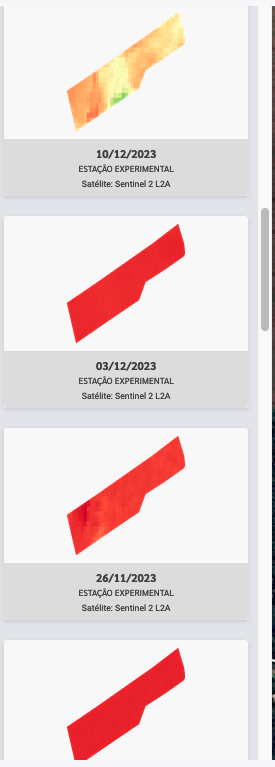
Here is my EvalScript:
private String getEvalScript() {
        return  "//VERSION=3\n" +
            "function setup() {\n" +
            "   return {\n" +
            "      input: [\"B04\", \"B08\", \"dataMask\"],\n" +
            "      output: { bands: 4 }\n" +
            "   };\n" +
            "}\n" +
            "\n" +
            "const ramp = [\n" +
            "    [\"-1\", \"0x000000\"],         // Black\n" +
            "    [\"-0.2\", \"0xa50026\"],       // Dark Red\n" +
            "    [\"0\", \"0xd73027\"],          // Red\n" +
            "    [\"0.1\", \"0xf46d43\"],        // Light Orange\n" +
            "    [\"0.2\", \"0xfdae61\"],        // Dark Orange\n" +
            "    [\"0.3\", \"0xfee08b\"],        // Light Yellow\n" +
            "    [\"0.4\", \"0xffffbf\"],        // Pale Yellow\n" +
            "    [\"0.5\", \"0xd9ef8b\"],        // Light Yellow-Green\n" +
            "    [\"0.6\", \"0xa6d96a\"],        // Medium Green\n" +
            "    [\"0.7\", \"0x66bd63\"],        // Dark Green\n" +
            "    [\"0.8\", \"0x1a9850\"],        // Very Dark Green\n" +
            "    [\"1\", \"0x006837\"]           // Forest Green\n" +
            "];\n" +
            "const visualizer = new ColorRampVisualizer(ramp);\n" +
            "function evaluatePixel(samples) {\n" +
            "   let ndvi = index(samples.B08, samples.B04);\n" +
            "   let imgVals = visualizer.process(ndvi);\n" +
            "   return imgVals.concat(samples.dataMask);\n" +
            "}\n";
    }
Not sure if I am getting those dominant red color because cloud coverage, but is there a way to check if the image is covered and also get the percentage of clouds?
