Modify Eolearn docker file to include ffmpeg

  • April 26, 2024
  • 6 replies
  • 300 views

I’m struggling with editing the eolearn docker file to include ffmpeg.
It is needed for the time series batch process notebook.

I tried to add ffmpeg to the original apt-get or to multi stage it FROM ubuntu:18.04

but ffmpeg is missing after the container is created.

Any ideas?

6 replies

Thanks but I already tried this and it does not work.
The error is : [Errno 2] No such file or directory: ‘ffmpeg’.
And also from the container terminal ffmpeg is missing, that is why I thought it should be added to the docker file, and I listed my attempts.
Maybe it should be compiled from source?


Hi @tonish,

I think you have to install ffmpeg-python Python package. So I recommend adding a line

pip3 install --no-cache-dir ffmpeg-python

into your dockerfile.

I also see that there exist a bunch of different ffmpeg packages and we never specified which one should be used. We’ll try to improve that in the future.


But that just says that the package is installed well. but the module is only a wrapper for ffmpeg, so just importing it is not enough.

So when you try to use it, as the case here,(see also photo), it fails with the error I wrote previusly.

Please try to run the first few cells in the notebook with your new container. It fails on the last cell before step #2.

We should have the same behavior since both of us created a new container from sentinelhub/eolearn:latest-examples and then installed ffmpeg-python.


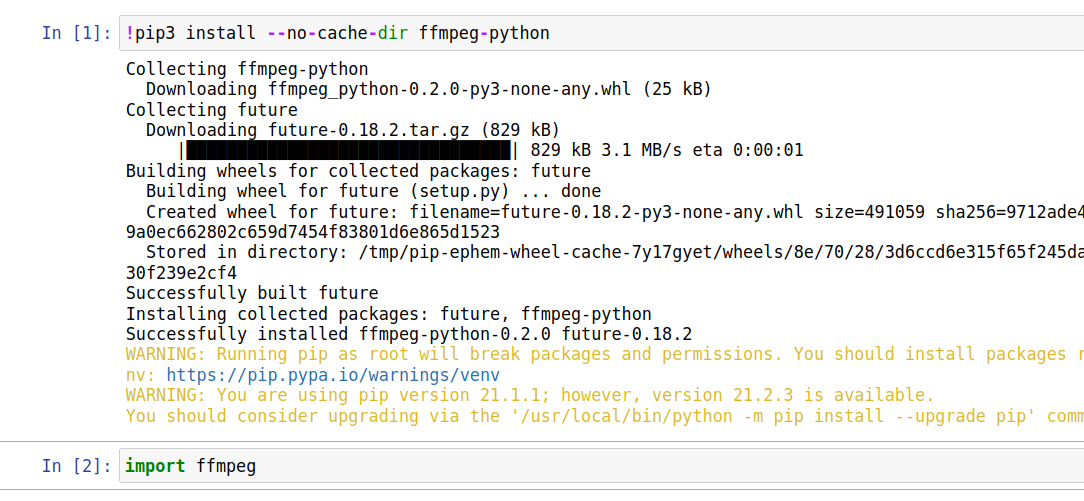
I tried it myself and it works. I started running a docker container from sentinelhub/eolearn:latest-examples, inside I installed the package and imported it:

This shows that the package can be simply installed without any extra system dependencies. It should also work if you add it to your docker file and create a new docker image on top of the one from eo-learn.

At what step exactly do you get the error?


Thank you its working for me now as well.

The only thing I don’t understand is why installing ffmpeg inside the docker worked, but adding “ffmpeg” to the docker file did not.

I added it this way:

FROM python:3.8-buster

LABEL maintainer="Sinergise EO research team <eoresearch@sinergise.com>"

RUN apt-get update && apt-get install -y \
        ffmpeg \
        gcc \
        libgdal-dev \
        graphviz \
        proj-bin \ 
       ......

and it should do the same as:

apt-get update
apt-get install -y ffmpeg

but I guess now it doesn’t matter and the issue is resolved.
Thank you


You are right, that wasn’t enough. I also had to install the system library ffmpeg inside the docker container (which is already running on sudo):

apt-get update
apt-get install -y ffmpeg

After that the system library was working but I was getting an error at the line:

video.output(f'{self.out_dir}/{self.out_name}.mp4', crf=15, pix_fmt='yuv420p', vcodec='libx264', an=None).run(overwrite_output=True)

It turned out the problem was that self.out_dir didn’t exist. So I had to add a line:

os.makedirs(self.out_dir, exist_ok=True)

before the problematic line. Then it successfully created a video and a gif.

Overall, the notebooks that are just in the eo-learn repository but not used for the official documentation are not that frequently maintained and can have such minor reproducibility issues. Thank you for pointing out this issue. 👍