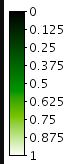
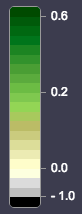
By default, when I open EO Browser, “no user configuration instance” is selected. Under this configuration I can select different layer. In particular, I am interested in NDVI layer. If I select NDVI layer under “Simply WMS instance”, the aspect is different from that layer under “no user configuration instance”. The second seems to have more resolution, different colors, image icon beside the name of the layer and a bar under the name showing the values corresponding to each color. Furthermore, in the “no user configuration instance” version, I can put a pin and get graphs of the NDVI values along the time. Why are they different? How could I replicate this layer? Is there any way to edit the default layers under “no user configuration instance” to see in depth how are they defined?

Default configuration in EO Browser
Enter your E-mail address. We'll send you an e-mail with instructions to reset your password.
© 2026 Planet Labs PBC. All rights reserved.
| Privacy Policy | California Privacy Notice |California Do Not Sell
Your Privacy Choices | Cookie Notice | Terms of Use | Sitemap
