Solved

Can't seem to clip to AOI when ordering data

  • September 1, 2026
  • 1 reply
  • 194 views

Mark D
Forum|alt.badge.img

Hi all,

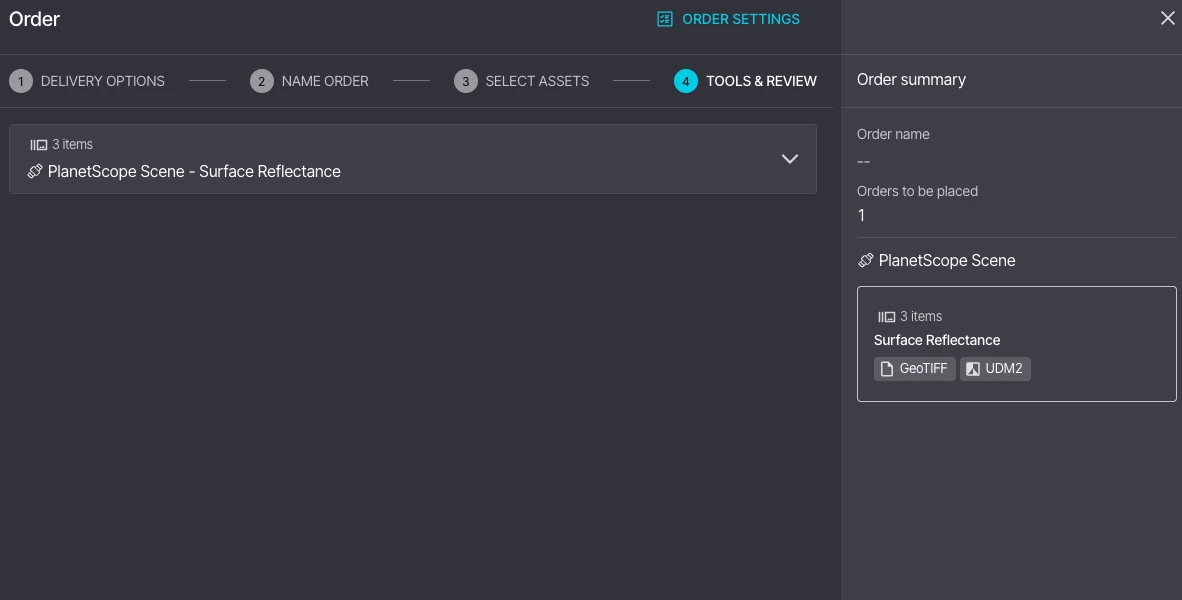
I’m not sure if this is an access issue or user error on my behalf, but I can’t seem to find the clip to AOI tool in the final stage before ordering data.

I followed this guide, but I can’t seem to be missing the dropdown in the final step: https://support.planet.com/hc/en-us/articles/ [removed by moderator] -How-to-Place-an-Order-with-Clipping-in-Planet-Explorer

Any suggestions!?

Mark

Best answer by elyhienrich

Hi ​@Mark D 
 

Common Reasons the Clipping Tool may not be available:

  • Your plan doesn't include clipping — The clip tool must be enabled for your account/plan. If it's not showing up at all, it may need to be activated by Planet. 
  • You're ordering a Basic Scene asset — The clip tool is not available for Basic Scene assets (e.g., Basic Analytic Radiance / TOAR), because these lack geometric correction and must be downloaded as whole scenes. 
  • Your AOI geometry is too complex — If your geometry has too many vertices or is otherwise complex, Planet Explorer automatically disables the clipping option to prevent order failure. 
  • Trial or evaluation account — Trial accounts cannot use the clip tool because clipping requires the same download entitlement as a full order, which trial accounts don't have.

Please let me know if none of these apply to you and I can route you to the support team for further investigation. 

1 reply

elyhienrich
Community Manager 🌎
Forum|alt.badge.img+17
  • Community Manager 🌎
  • Answer
  • September 3, 2026

Hi ​@Mark D 
 

Common Reasons the Clipping Tool may not be available:

  • Your plan doesn't include clipping — The clip tool must be enabled for your account/plan. If it's not showing up at all, it may need to be activated by Planet. 
  • You're ordering a Basic Scene asset — The clip tool is not available for Basic Scene assets (e.g., Basic Analytic Radiance / TOAR), because these lack geometric correction and must be downloaded as whole scenes. 
  • Your AOI geometry is too complex — If your geometry has too many vertices or is otherwise complex, Planet Explorer automatically disables the clipping option to prevent order failure. 
  • Trial or evaluation account — Trial accounts cannot use the clip tool because clipping requires the same download entitlement as a full order, which trial accounts don't have.

Please let me know if none of these apply to you and I can route you to the support team for further investigation.