
Getting metadata using SentinelHubRequest

  • April 26, 2024
  • 6 replies
  • 337 views

Hello everyone,

Is there a way to get the metadata of the downloaded image? Like the date or the name of the Tile.

I’am using the SentinelHubRequest class.

And calling the method like:

    request_all_bands = SentinelHubRequest(
    data_folder = sentinel_folder,
    evalscript=evalscript_all_bands,

    input_data=[
        SentinelHubRequest.input_data(
            data_source=DataSource.SENTINEL2_L2A,
            time_interval=('2020-01-01', '2020-09-11'),
            mosaicking_order= "mostRecent",
            maxcc= 0.05,        
    )],
    responses=[
        SentinelHubRequest.output_response('default', MimeType.TIFF)
    ],
    bbox=bbox,
    size=size,
    config=config)

6 replies

thanks I could make it work correctly, but it seems that the metadata for sentinel2-L2A is empty, finally I ended up using WcsRequest, to get the information


It is.

curl example is shown in Sentinel Hub docs. With Python an example that retrieves a normalisation factor for S2L1C data is shown in this example .

Outputing the ‘scene’ object should probably get all the info you are after, see scene object description on SH docs.

Hope that helps.


I faced same issue. Any update?


batic:
evalscript = """
    //VERSION=3

    function setup() {
        return {
            input: [{
                bands: ["B02", "B03", "B04"],
                units: "DN"
            }],
            output: {
                bands: 3,
                sampleType: "INT16"
            },
            mosaicking: Mosaicking.TILE
        };
    }

    function updateOutputMetadata(scenes, inputMetadata, outputMetadata) {
        outputMetadata.userData = { "norm_factor":  inputMetadata.normalizationFactor, 
                                    "scenes":  JSON.stringify(scenes)}
    }

    function evaluatePixel(sample) {
        return [sample.B04, sample.B03, sample.B02];
    }
"""

i am using your script and get all metadata, but the image only return number 0 or nan, you know why?
When i remove “mosaicking: Mosaicking.TILE”, the image return well.
thanks .


Hi,

It works for me, using the following:

evalscript = """
//VERSION=3

function setup() {
return {
input: [{
bands: ["B02", "B03", "B04"],
units: "DN"
}],
output: {
bands: 3,
sampleType: "INT16"
},
mosaicking: Mosaicking.TILE
};
}

function updateOutputMetadata(scenes, inputMetadata, outputMetadata) {
outputMetadata.userData = { "norm_factor": inputMetadata.normalizationFactor,
"scenes": JSON.stringify(scenes)}
}

function evaluatePixel(sample) {
return [sample.B04, sample.B03, sample.B02];
}
"""

request_multitype = SentinelHubRequest(
evalscript=evalscript,
input_data=[
SentinelHubRequest.input_data(
data_collection=DataSource.SENTINEL2_L2A,
time_interval=('2020-06-01', '2020-06-30'),
mosaicking_order='leastCC'
)
],
responses=[
SentinelHubRequest.output_response('default', MimeType.TIFF),
SentinelHubRequest.output_response('userdata', MimeType.JSON)
],
bbox=betsiboka_bbox,
size=betsiboka_size,
config=config
)

multi_data = request_multitype.get_data()[0]
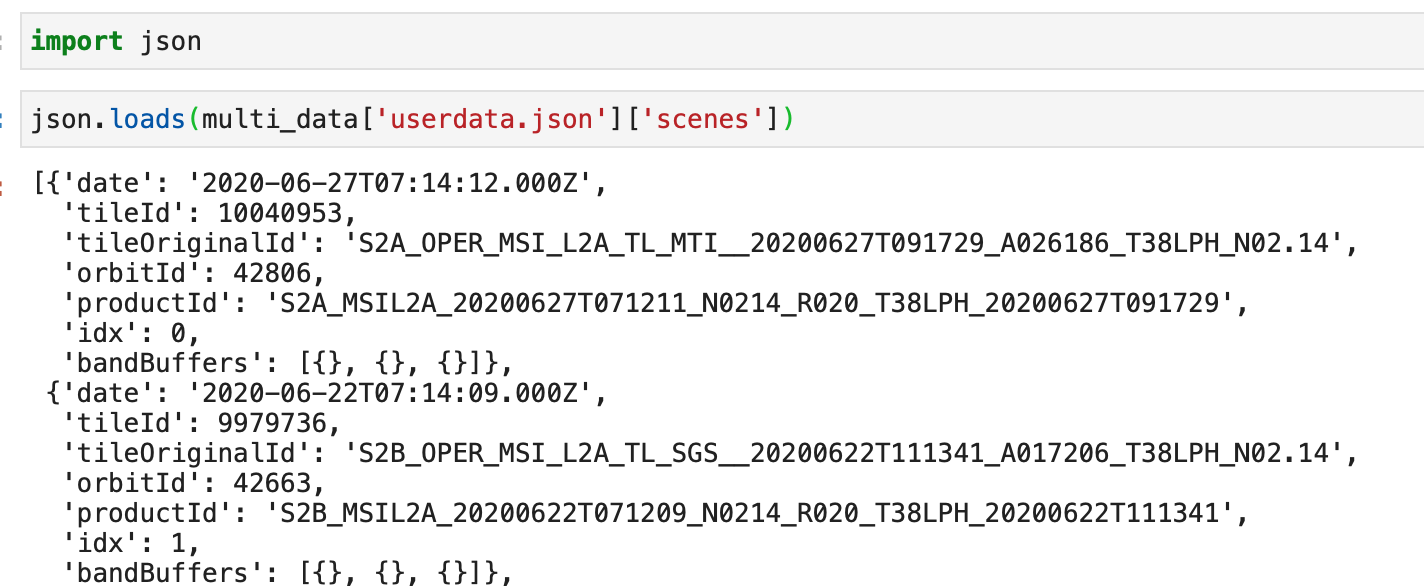
multi_data['userdata.json']['scenes']

gives me this:

Hope this will help.


Hi,

When using TILE mosaicking the sample object in the evaluatePixel function is an array. You need to specify to which item you want to access, e.g. return [sample[0].B04, sample[0].B03, sample[0].B02]; (see our documentation for more details).

If this does not help, please share your curl command and we will have a look at it.